


Content
What is Crypto Swap
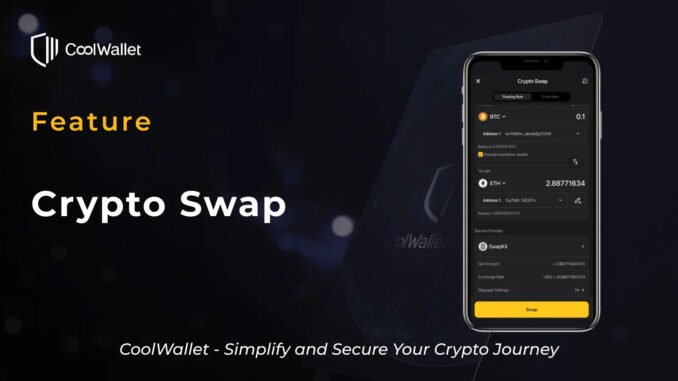
Crypto swap refers to directly exchanging one cryptocurrency for another without placing orders on a traditional exchange. For example, you can swap USDT directly into ETH, or convert BTC into USDC.
Unlike traditional exchange trading, crypto swaps do not require placing buy or sell orders or waiting for order matching. Instead, swaps are executed instantly based on current market prices through liquidity pools, market makers, or DEX aggregators. This allows users to complete asset conversions in a faster and more intuitive way.
When swapping within a self-custodial wallet like CoolWallet, users can complete transactions while retaining full control of their private keys. There is no need to transfer assets to an exchange account, enhancing security while maintaining convenience.
How Crypto Swap on CoolWallet Differs from Exchanges
Swapping crypto in CoolWallet is fundamentally different from trading on a traditional exchange.
First, the trading mechanism is different. Exchanges rely on an order book, where users place buy or sell orders and wait for matching. CoolWallet’s swap feature connects to liquidity pools, market makers, and aggregators, allowing you to swap instantly at current market prices without waiting.
Second, asset control is fundamentally different. On exchanges, funds are deposited into platform accounts and held in custody. With CoolWallet, your assets remain in your wallet at all times, and you keep full control of your private keys, ensuring true self custody.
Third, the fee structure differs. Exchanges typically charge trading fees and may also include withdrawal fees. With CoolWallet, costs mainly come from blockchain network fees and service fees from swap providers and CoolWallet.
Finally, the user experience is designed for different needs. Exchanges offer advanced tools suited for professional trading. CoolWallet focuses on simplicity, making it easy to swap assets quickly without dealing with complex interfaces.
If your goal is to convert assets quickly while maintaining full control and security, CoolWallet’s crypto swap offers a more intuitive and secure approach.
Types of Crypto Swaps
When swapping crypto in CoolWallet, different swap types can be categorized based on how they operate and how pricing is determined:
Centralized Services (CEX) vs Decentralized Services (DEX)
Centralized Services (CEX)
In this model, the provider manages liquidity and executes trades internally. Users transfer assets into the platform, where trades are handled directly by the provider. This typically results in deeper liquidity and a smoother trading experience, but asset control is held by the platform. In some cases, users may also need to complete KYC identity verification.
Decentralized Services (DEX)
Trades are executed through smart contracts and liquidity pools on the blockchain. Users can swap directly from their own wallets without transferring assets to a third party. This model emphasizes self custody and transparency, but pricing may be affected by liquidity conditions and slippage.
Note: Slippage refers to the difference between the expected price and the actual executed price of a trade.
Fixed Rate vs Floating Rate
Fixed Rate
The exchange rate is locked at the moment you confirm the transaction. Even if market prices fluctuate, the final received amount remains the same. To provide this price guarantee, service providers usually include a small premium. This option is suitable for users who want to avoid slippage and prefer certainty.
Floating Rate
The exchange rate changes in real time based on market conditions. The final executed price may differ slightly from the quoted price at the time of the order. This option typically offers rates closer to the market but comes with exposure to price fluctuations.
Single-chain Swaps vs Cross-Chain Swaps
Single-chain Swap (or On-chain Swap)
The swap is completed within the same blockchain, such as converting ETH to USDC on Ethereum. These transactions are generally simpler, faster, and lower in cost.
Cross-Chain Swap
The swap occurs between different blockchains, such as converting BTC to ETH. These transactions usually require bridges or cross-chain protocols, making the process more complex, with potentially higher fees and longer processing times.
Why Swap Crypto with CoolWallet
Supported Products
✅ CoolWallet S
Benefits of Swapping Crypto with CoolWallet
Full Self Custody
You retain complete control of your private keys without transferring assets to an exchange, reducing the risk of asset freezes or exposure.
High Security
With CoolWallet Pro, Go, or S, your private keys are securely stored in a hardware chip, isolated from online threats to help protect your assets.
Better Privacy and Asset Control
No need to create an exchange account. In most cases, you can swap directly from your wallet without providing personal information, reducing the risk of data exposure.
Note: In some scenarios, KYC verification may still be required.
Fast and Intuitive Experience
A user friendly interface simplifies the swap process, with no need to place orders or wait for matching.
Access to Better Rates Through Aggregation
By integrating multiple liquidity sources and providers, you can compare and choose the most favorable swap rates.
Multi Asset and Multi Chain Support
Supports a wide range of major crypto assets across multiple blockchains, including cross chain swaps for greater flexibility in asset management.
All in One Experience
Manage and swap your assets within a single app, without moving funds across platforms, improving both efficiency and convenience.
Instructions
How to Swap Crypto
Step 1. Open the CoolWallet App. Go to the Wallet page → tap Swap to enter the Crypto Swap page.

Step 2. Select the assets to swap, including the token you want to send and the token you want to receive.
Note: If you select BTC as the sending asset, you will see an option to exclude inscription assets. It is recommended to enable this option.
Inscription assets are data attached to individual satoshis, such as images, text, or token information. These assets share the same UTXO as regular BTC and may be mixed together. If not excluded, you may unintentionally send satoshis that contain inscriptions, which could result in the loss of assets with additional value.

Step 3. Select the swap addresses, including the sending address and the receiving address.

Note: You can also set a receiving address outside of your wallet. Tap the icon next to the receiving address to manually enter an address. This feature is not supported for some assets. Please refer to the FAQs for the list of unsupported assets.

Step 4. Enter the amount. CoolWallet will automatically display the best available provider based on current rates. Tap the provider to view and compare other available quotes.

Note: If you choose a decentralized service DEX, you can manually adjust slippage.
Slippage refers to the difference between the expected price and the actual execution price. You can set it between 0.1 percent and 50 percent. A higher slippage increases the chance of successful execution but may result in a larger price difference.

Step 5. Tap Swap and review the order details.

Step 6. Confirm the transaction details and complete verification to submit the transaction.

How to Check Order Status
On the Crypto Swap page, tap the icon in the top right corner to view your order history. Select a specific order to see its status and detailed information.

FAQs
Q1. How long does a crypto swap take to complete?
The time required depends on the selected provider, blockchain network conditions, and whether it is a cross chain swap. Single chain swaps are typically completed within a few minutes, while cross chain swaps or network congestion may result in longer processing times.
Q2. Why is the received amount different from the estimated amount?
If you choose a floating rate or use a DEX service, the final execution price may be affected by market fluctuations and slippage, resulting in a difference between the estimated and actual received amount.
Q3. What happens if a swap fails?
If the transaction is not completed successfully, the assets are usually returned to the original sending address. The exact handling may vary by provider. You can check the order details page or contact the provider for support.
Q4. Can I cancel a swap after it has been submitted?
Once the transaction is submitted and confirmed on chain, it usually cannot be canceled. Please double check the asset, address, and amount before confirming the transaction.
Q5. Why do I need to pay network fees gas fees?
Network fees are paid to the blockchain to process and validate transactions. This applies to all on chain activities, regardless of whether you are using CoolWallet or other services.
Q6. Is KYC verification required?
In most cases, you can complete swaps without providing personal information. However, in certain situations, some providers may still require KYC verification to comply with regulations.
Q7. Can I send swapped assets directly to another wallet address during the swap process?
Yes. You can set a custom receiving address during the swap process, including addresses outside of your CoolWallet. Please ensure the address is correct to avoid asset loss.
However, this is not supported for certain assets, including XRP, BNB, XLM, KAU, KAG, LUNA, LUNC, CROORG, ATOM, and TON.
Q8. Why is it recommended to exclude inscription assets when sending BTC?
Inscription assets may be attached to satoshis and share the same UTXO as regular BTC. If not excluded, they may be unintentionally transferred along with your BTC, potentially resulting in the loss of assets with additional value.



Be the first to comment