



Collecting the first crypto payment is only part of running a subscription business. If customers have to open a new invoice and make another transfer every billing cycle, recurring revenue still depends on repeated manual payments.
NOWPayments subscriptions let merchants create a billing plan once, add customers, and manage recurring payments from the dashboard. For supported billing intervals, customers can authorize future payments through ChangeNOW instead of completing a separate checkout for every renewal.
This guide covers the current dashboard flow, from creating a plan and adding a customer to collecting the first payment, tracking renewals, and handling failed payments.
How NOWPayments Crypto Subscriptions Work
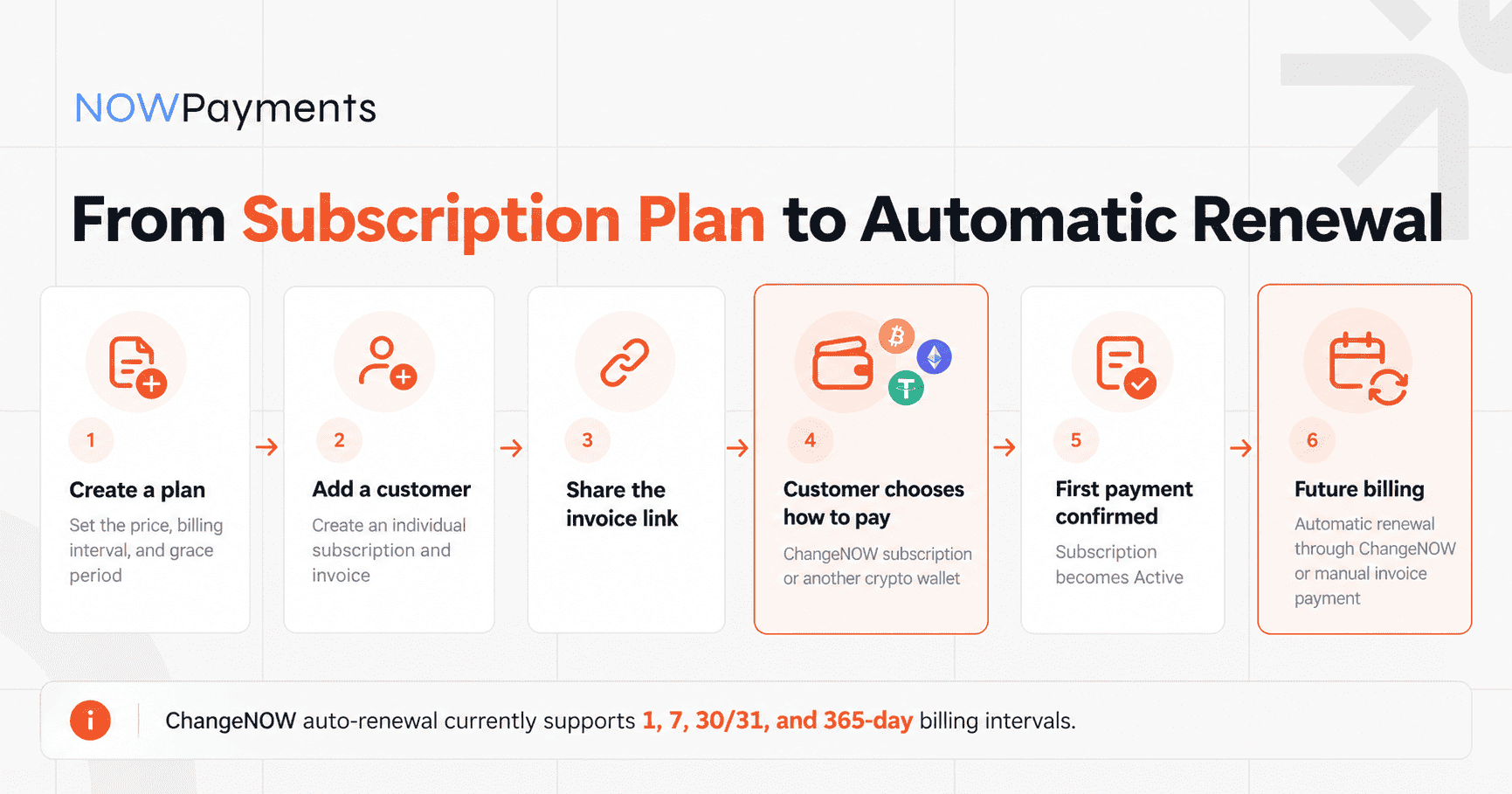
The subscription flow starts in the Subscriptions section of the NOWPayments dashboard.

- Create a subscription plan. Set the price, billing interval, and other plan conditions.
- Add a customer. NOWPayments creates an individual subscription and invoice link for that customer.
- Customer chooses how to pay. The customer receives an individual invoice link, also visible in the merchant dashboard, and decides whether to enable automatic renewals through ChangeNOW or make a one-time payment from another crypto wallet.
- Continue with automatic or manual renewals. If the customer pays through ChangeNOW, future payments can follow the configured schedule automatically. Custom billing intervals outside the ChangeNOW-supported schedules continue through the regular invoice-based flow.
1. Create a Subscription Plan
Open Subscriptions in the NOWPayments merchant dashboard.
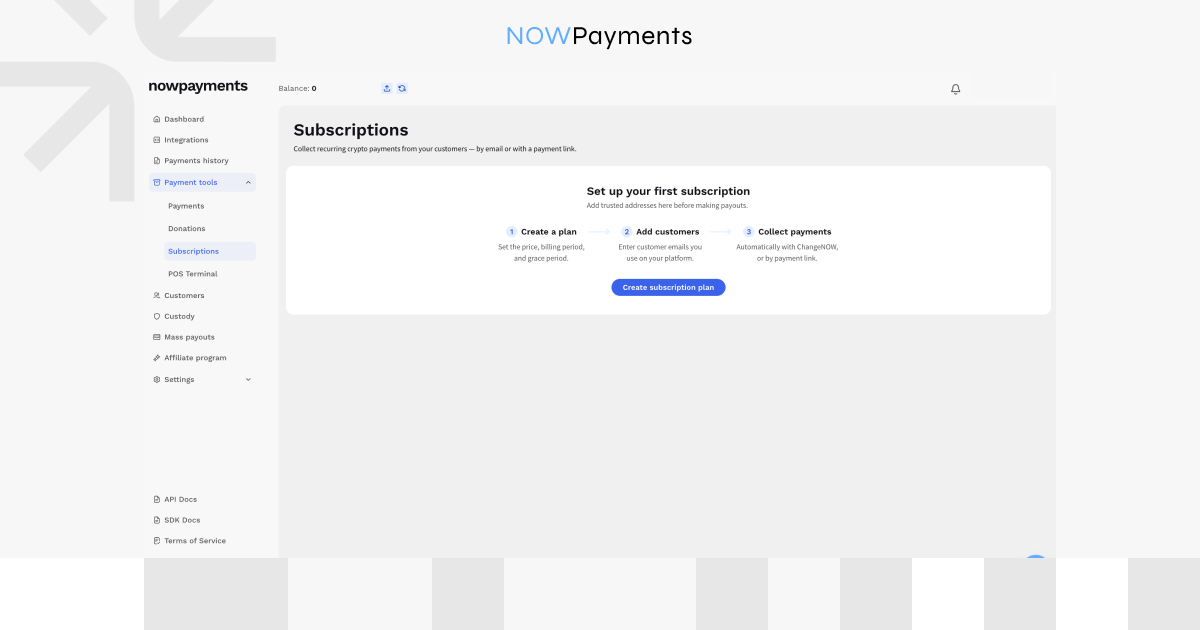
Select the option to create a subscription plan.
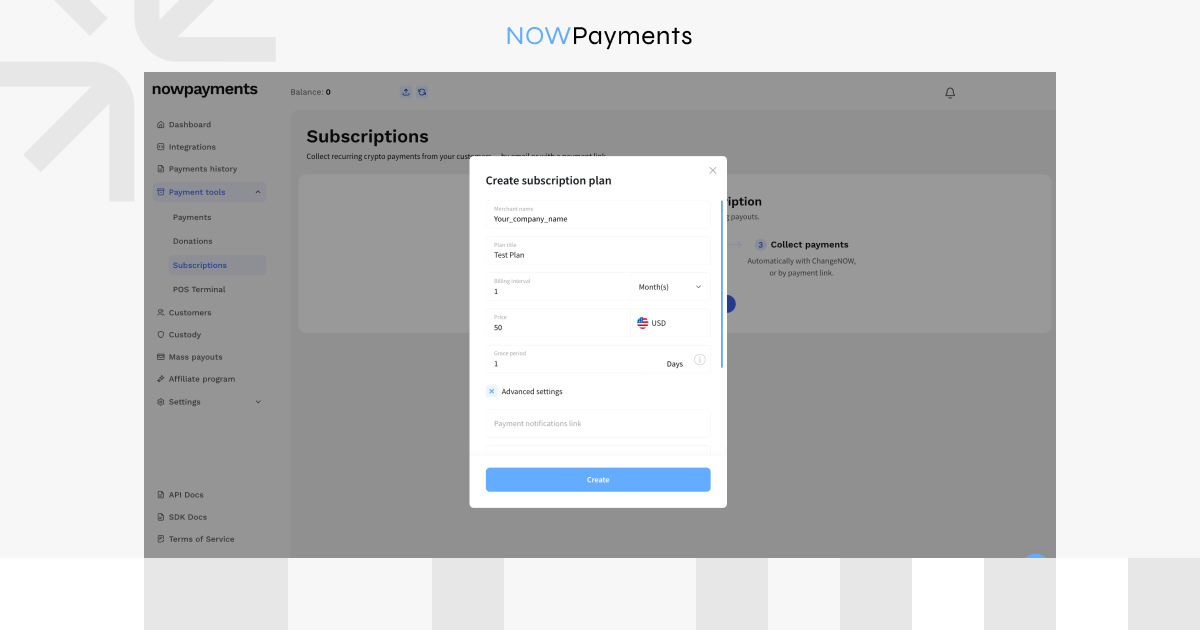
The plan defines the billing conditions that will later be reused for its subscribers.
The current setup includes:
- Merchant name: the business name the customer should recognize;
- Plan title: for example, Starter, Pro, or Enterprise;
- Price: the amount charged each billing cycle;
- Currency: the plan uses the base currency selected in the merchant account, which can be any supported fiat currency. The customer completes the invoice in crypto;
- Billing interval: how often the subscription renews. Merchants can set a custom number of days, weeks, months, or years.
- Payment grace period: additional time allowed for a renewal payment to complete;
- Advanced settings: additional payment settings, such as the payment notifications link.
You can set the merchant name individually for each subscription plan, which is useful if one NOWPayments account manages subscriptions for several products or projects.
Which Billing Intervals Support ChangeNOW Auto-Renewal?
For the ChangeNOW subscription option to be available, the plan needs to use one of the supported billing intervals.
| Billing period | Interval in days | ChangeNOW auto-renewal |
| Daily | 1 | ✓ |
| Weekly | 7 | ✓ |
| Monthly | 30 or 31 | ✓ |
| Yearly | 365 | ✓ |
| Other interval | Custom | Manual invoice flow |
A 30 or 31-day interval is not the same as charging on a fixed calendar date every month. Renewals follow the actual number of days configured in the plan.
For example, a plan set to 31 days renews every 31 days rather than necessarily on the same date of each calendar month.
ChangeNOW currently applies a $500 daily total per customer for this payment flow. This is a daily total rather than a separate limit for every invoice.
Set a Payment Grace Period
The plan can also include a payment grace period.
This gives a renewal additional time to complete after it becomes due if the first payment attempt is unsuccessful.
The grace period can currently be set from 0 to 5 days and cannot be longer than the subscription period itself.
It does not change the plan’s billing interval. For example, adding a three-day grace period to a 31-day plan does not turn it into a 34-day billing cycle.
We will cover failed renewals in more detail later in the guide.
2. Add a Customer and Get Their Invoice Link
Once the plan is ready, open it.
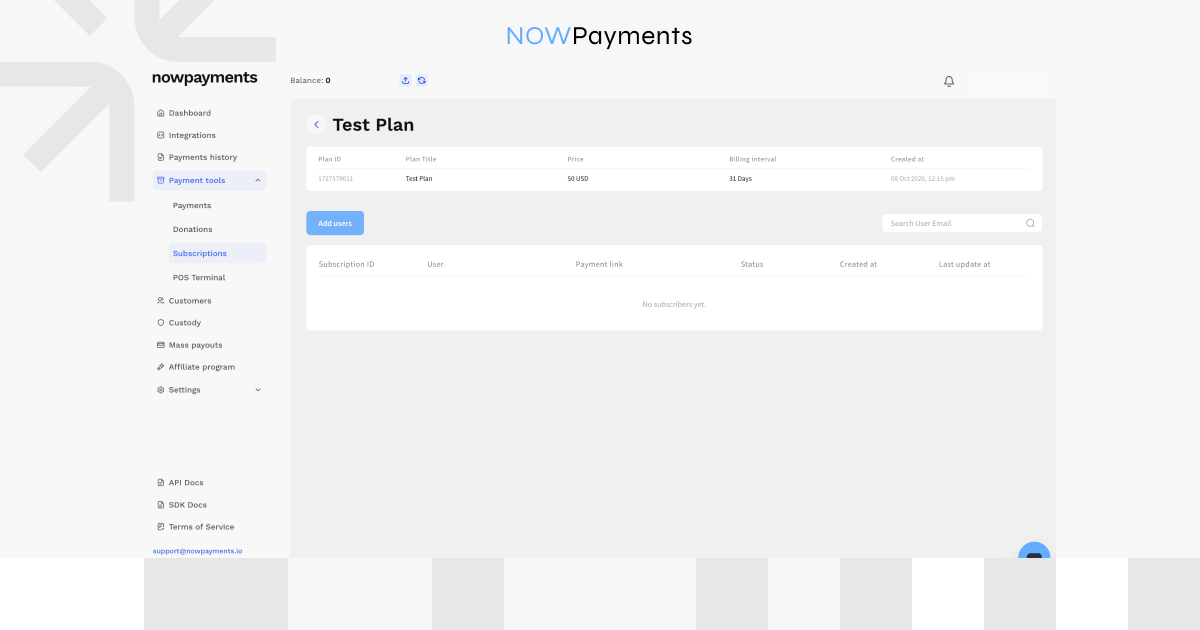
Click Add users and enter one or more customer email addresses. Multiple emails can be added at once by separating them with commas. Select Send invitations to create individual subscriptions for those customers.
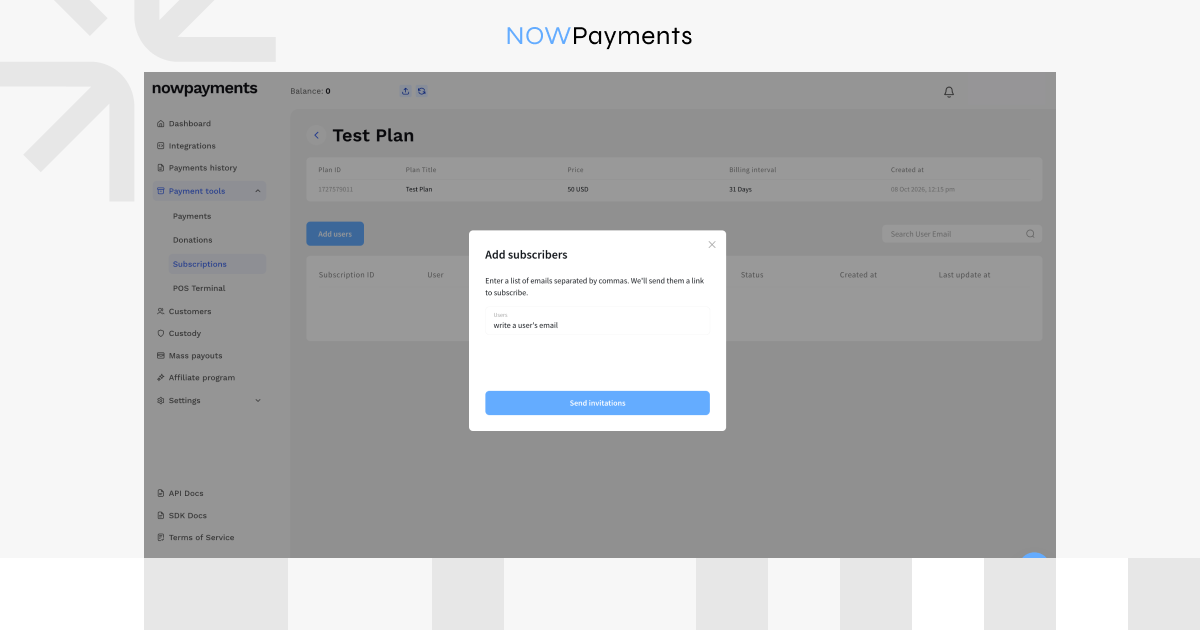
NOWPayments creates a separate subscription and first invoice for that customer. Before the first payment is completed, the subscription has an Inactive status.
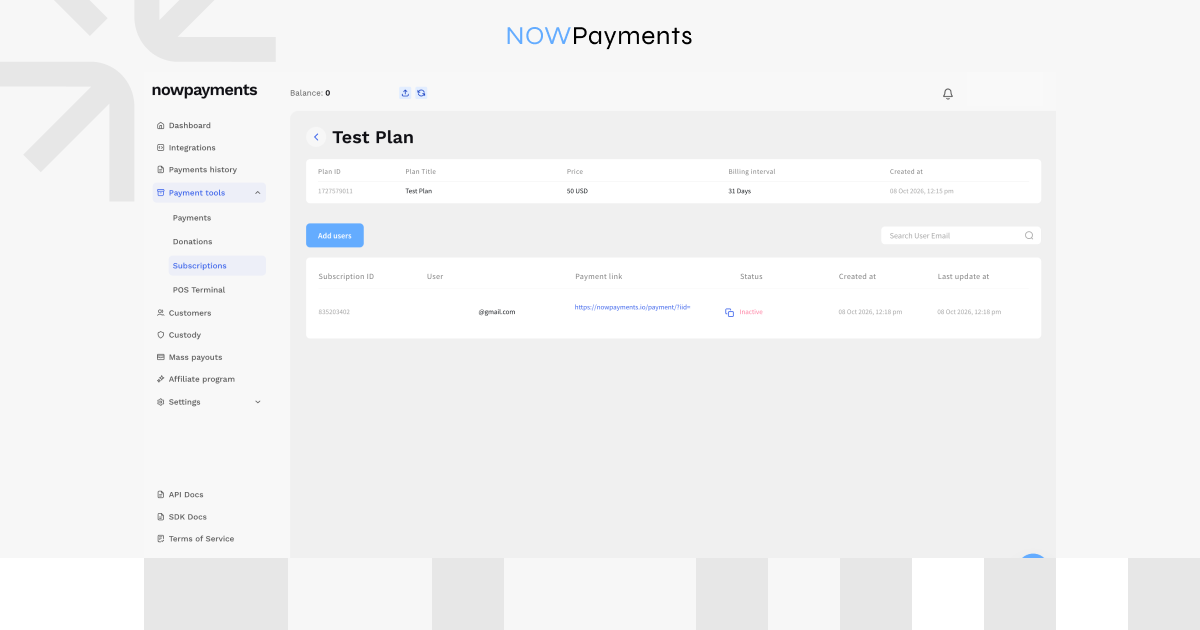
The customer’s row includes information such as:
- Subscription ID;
- email address;
- payment link;
- subscription status;
- creation and update timestamps.
The payment link may take up to one minute to appear after the customer is added. NOWPayments also sends the customer a branded email with a secure payment link to activate the subscription. The same link appears in the merchant dashboard, where the merchant can copy and share it manually if needed.
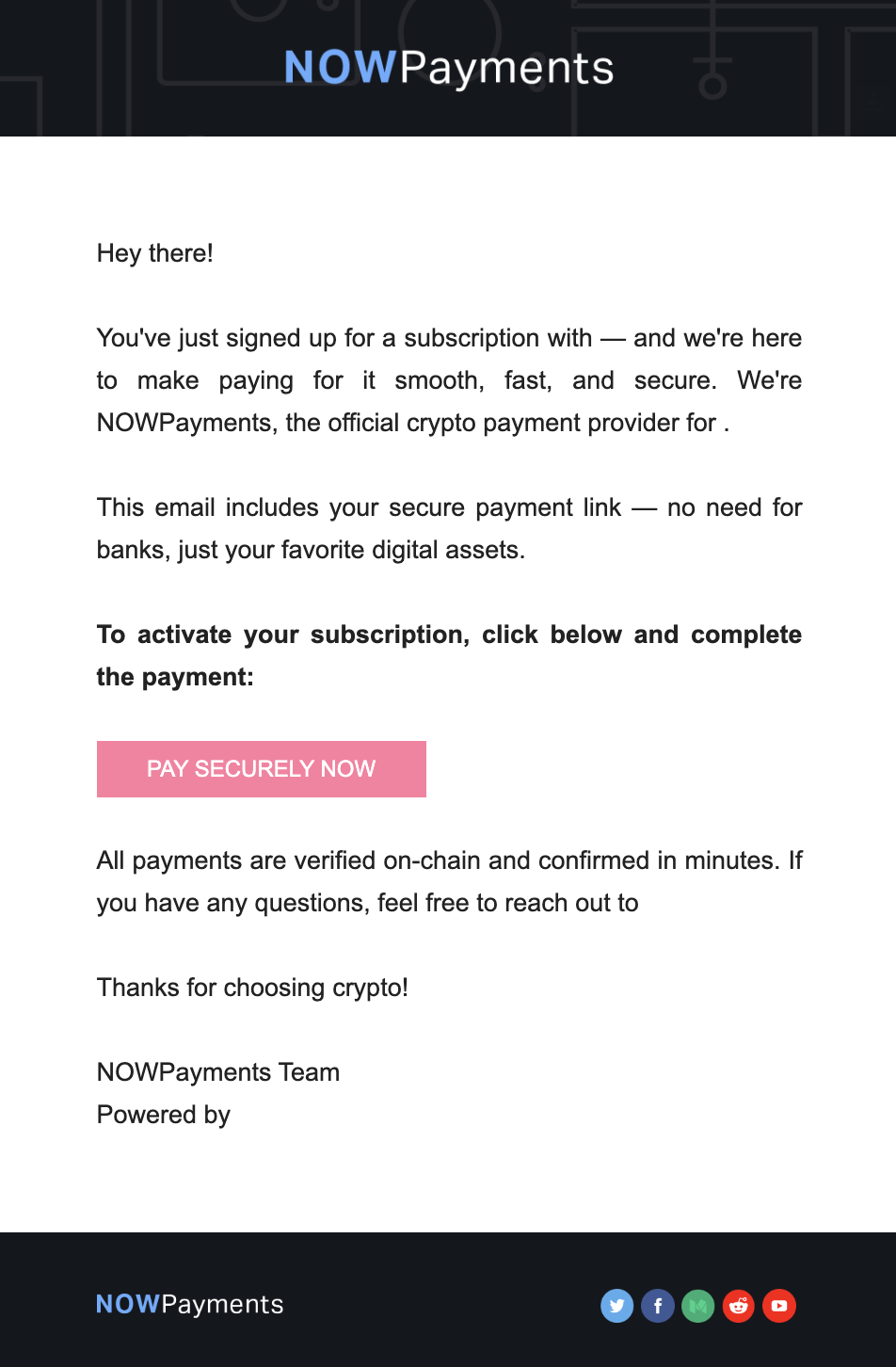
Each payment link belongs to an individual subscription, so if you share it manually, make sure the correct link is sent to the corresponding customer.
3. The Customer Chooses How to Pay
When the customer opens the invoice link, they can choose how to pay the first invoice.
At first, the customer should choose the asset to pay for the subscription and then click the Next step button:
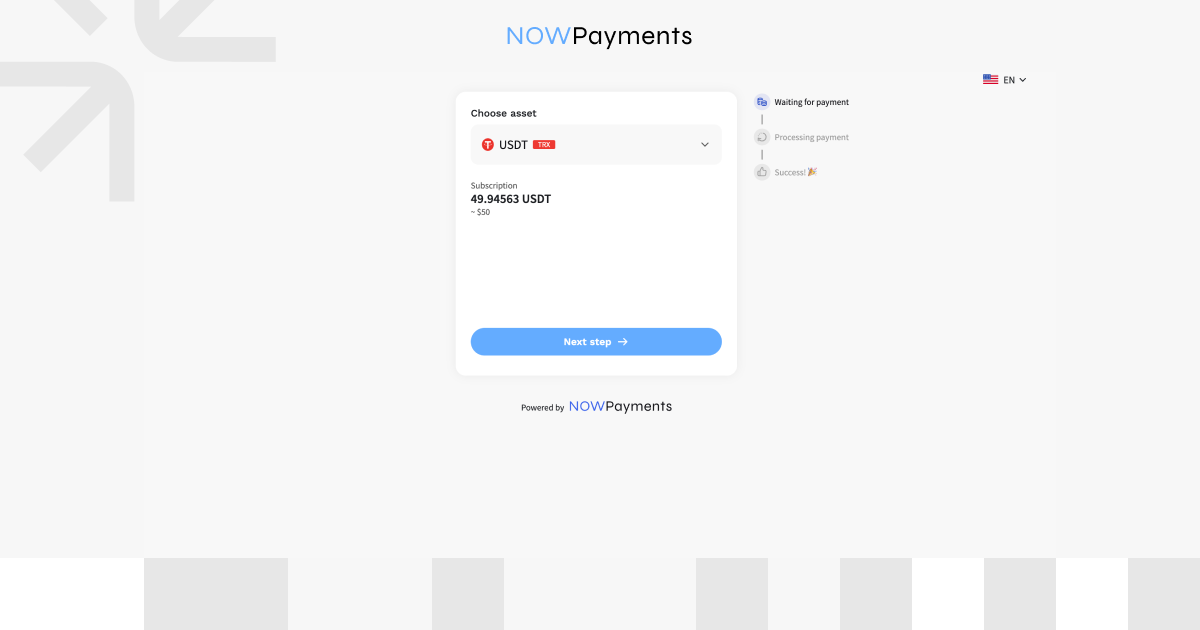
For a plan that supports ChangeNOW recurring payments, the customer can then choose between two payment options:
- start a subscription through ChangeNOW;
- make a one-time payment from another supported crypto wallet.
The invoice shows the amount due today, the renewal interval, and the next charge date.
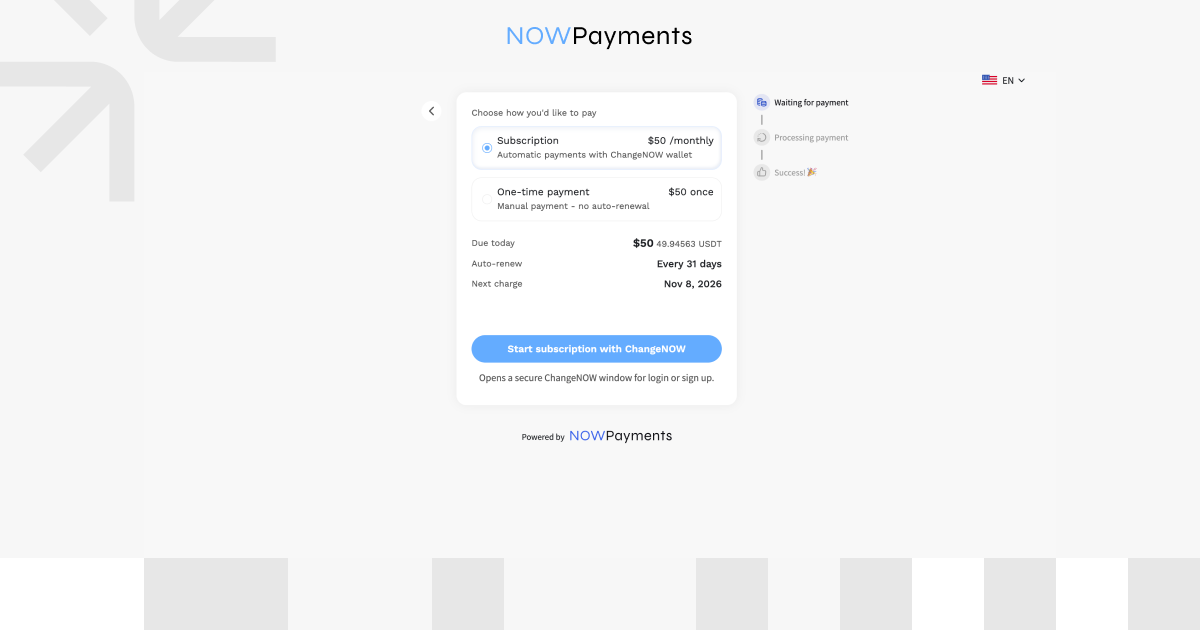
| Payment option | Current invoice | After the first payment | Future payments |
| ChangeNOW | Paid through ChangeNOW | Subscription becomes Active | Automatic renewals after authorization, subject to payment conditions |
| Another crypto wallet | Paid from the customer’s wallet | Subscription becomes active for the paid period | Customer pays future invoices manually |
Both options can activate the subscription for the current paid period. The main difference is what happens afterward: only the ChangeNOW route authorizes automatic future payments.
Paying from Another Crypto Wallet
If the customer chooses another wallet, they select a supported asset and send the requested amount to the payment address shown on the invoice or use the QR code.
Once the payment is confirmed, the subscription becomes Active for the paid period.
This payment does not start the ChangeNOW auto-renewal flow. Future renewal invoices must be paid manually.
4. Authorize Automatic Payments Through ChangeNOW
If the customer selects the ChangeNOW subscription option, they continue to the ChangeNOW payment flow.
The customer:
- signs in to an existing ChangeNOW account or creates one;
- completes the required authentication, including two-factor authentication when requested;
- reviews the merchant, plan, amount, billing interval, and next automatic payment date;
- authorizes recurring payments;
- confirms the first payment.
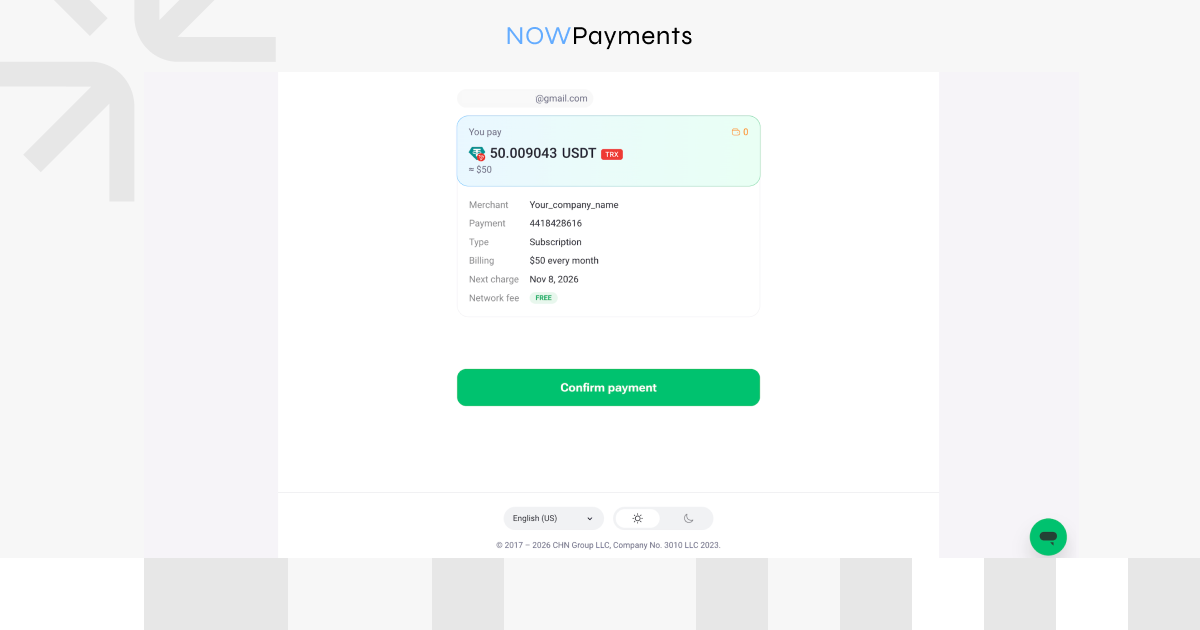
Once the payment is confirmed in ChangeNOW, the customer sees the successful payment result and returns to the invoice.
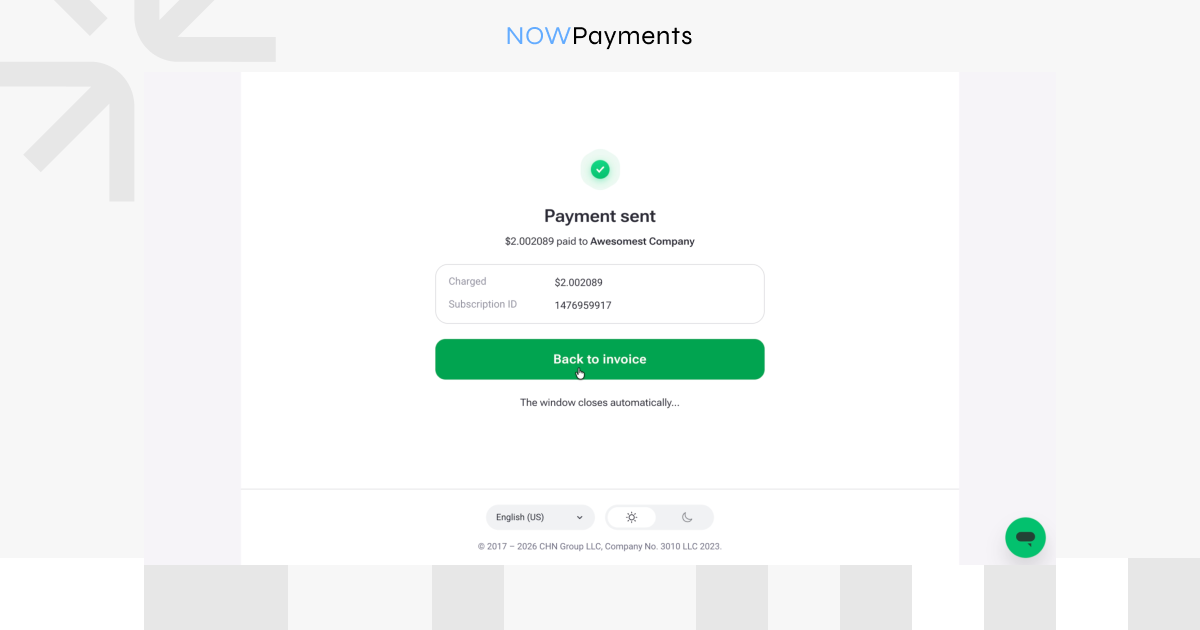
The invoice then shows that the payment was completed, the subscription is Active, and the next charge has been scheduled.
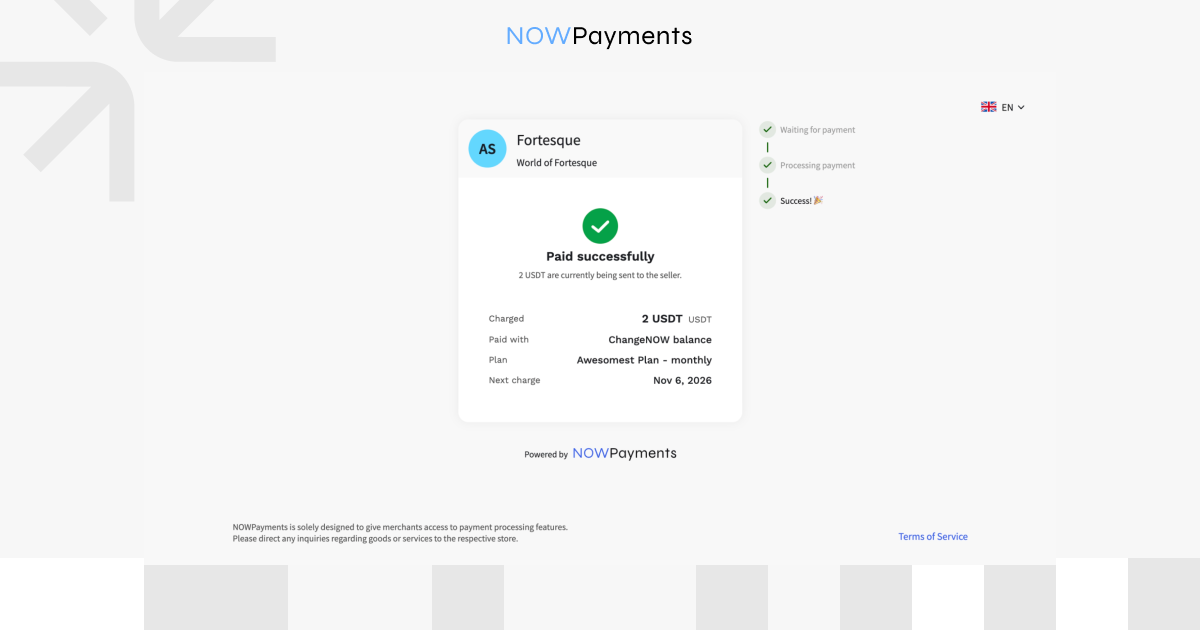
If the customer already has sufficient funds available, they can be used for the subscription payment. Otherwise, the customer can fund the required balance through the available ChangeNOW flow.
After the first payment is confirmed:
- the first invoice is paid;
- the subscription changes from Inactive to Active;
- automatic renewals are enabled;
- the next automatic payment date is shown.
The important difference for the customer is that authorization is completed once. While auto-renewal remains enabled and payment conditions are met, they do not need to manually check out again for each renewal.
5. Track and Manage Subscription Renewals
Once the first ChangeNOW payment is complete, renewals follow the billing interval configured for the plan.
At each scheduled billing date:
- NOWPayments creates the renewal payment request.
- The payment is initiated through the ChangeNOW flow.
- If the payment succeeds, the subscription remains Active.
- The next billing date is scheduled.
Customers can review their subscription transactions in ChangeNOW, while merchants can follow subscription and payment activity from the NOWPayments dashboard.
Track the Subscription and Individual Payments
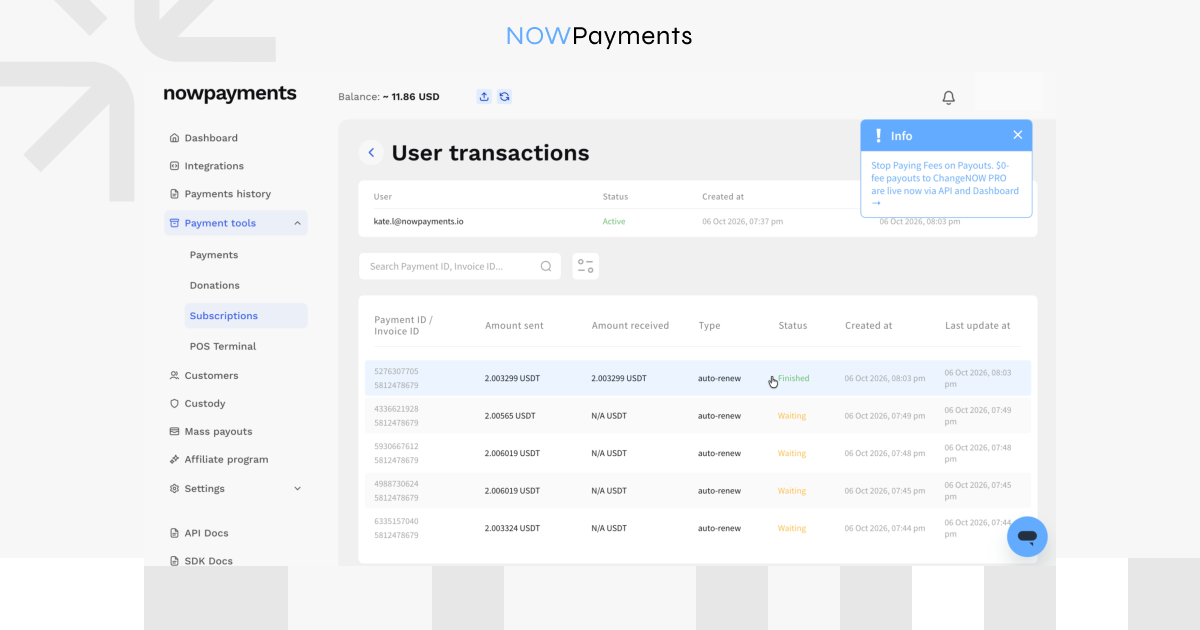
On the merchant side, open the customer’s User transactions page to see the subscription status and individual payment attempts.
In the plan’s user list, merchants can check:
- Payment/Invoice ID;
- amount sent;
- amount received;
- type;
- subscription status;
- Timestamps.
For individual transactions, merchants can open the customer’s transaction history and review details such as:
- Plan name;
- Payment ID;
- Invoice ID;
- Price amount;
- Pay amount;
- Asset;
- Actually paid;
- Outcome amount;
- Status;
- Timestamps.
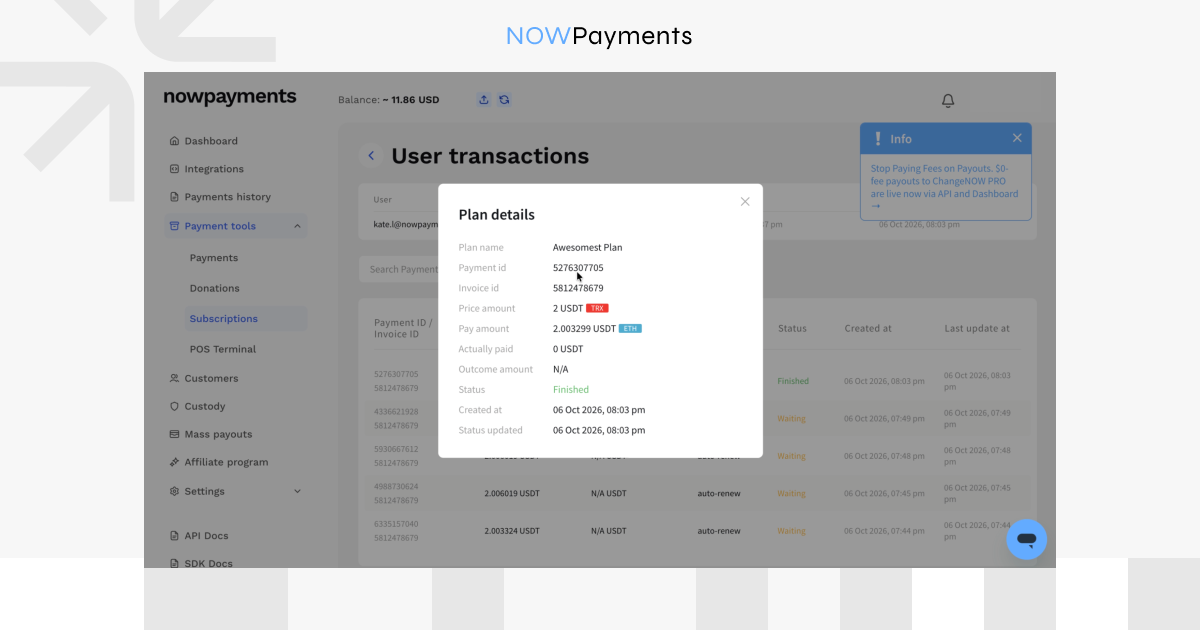
Payments made from a regular crypto wallet are identified as one-time, while payments made through the ChangeNOW recurring flow are identified as auto-renew.
An Active subscription does not mean that all future invoices have already been paid. Subscription status shows whether the subscription is currently active, while payment history shows the result of an individual invoice.
What Happens If a Subscription Renewal Fails?
A failed renewal does not necessarily end the subscription immediately.
If the plan has a payment grace period, the unsuccessful renewal has additional time to complete before the subscription expires.
The system can retry the payment during that configured period. A successful payment keeps or returns the subscription to Active status.
If the renewal is not completed before the grace period ends, the subscription expires and no further automatic payments are initiated.
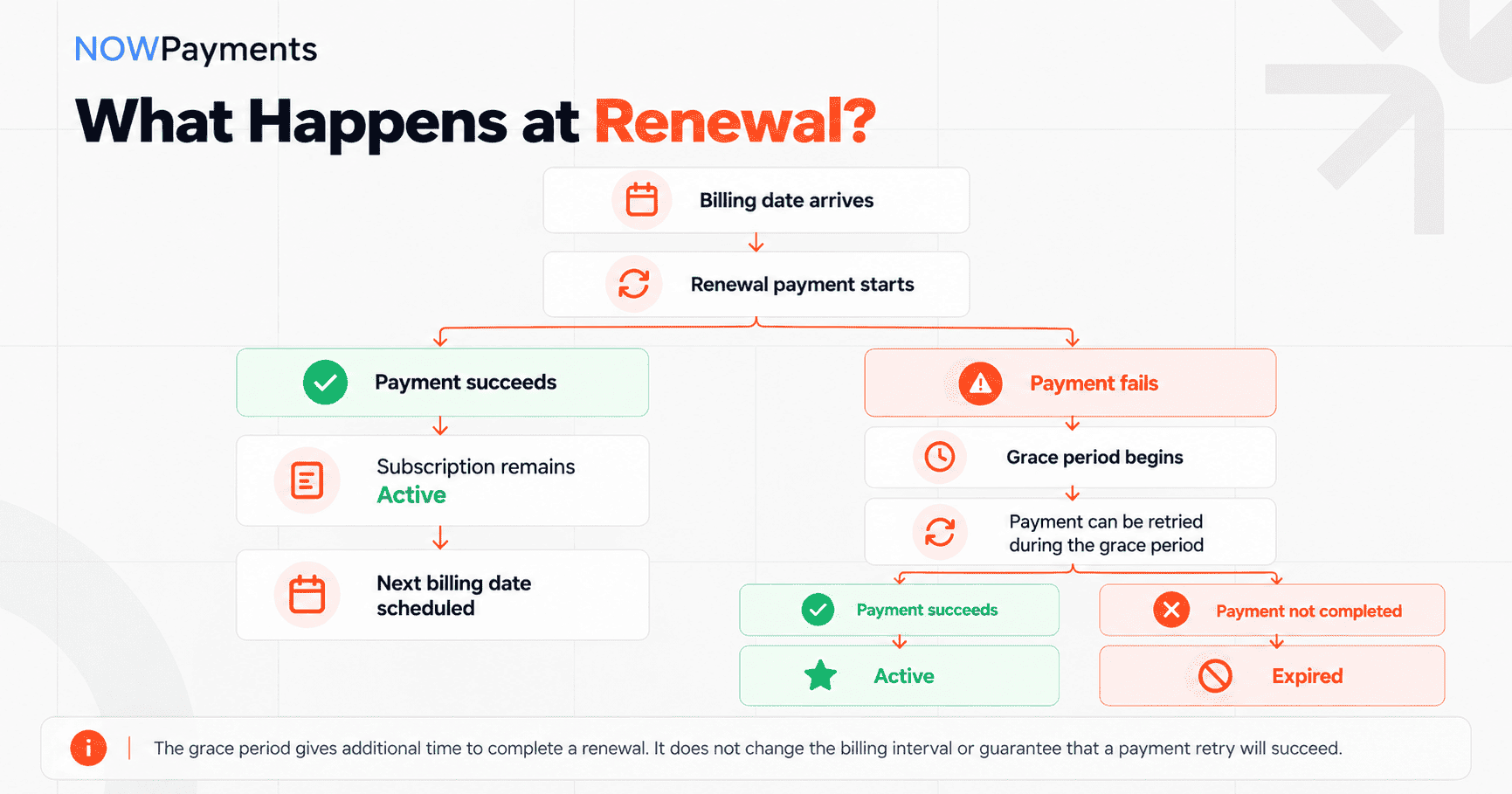
For example, if a plan has a three-day grace period and the renewal is unsuccessful on its due date, the payment still has the configured grace window to complete.
If it succeeds within that period, the subscription remains or becomes Active. If not, the subscription expires.
How Custom Subscription Intervals Work
Merchants are not limited to the intervals supported by ChangeNOW auto-renewal.
NOWPayments can also be used with custom billing intervals. Merchants can set a custom number of days, weeks, months, or years depending on their subscription model.
In this case, the subscription uses the standard invoice-based flow rather than ChangeNOW automatic renewal.
The customer completes each renewal invoice manually. If a payment grace period is configured, they have that additional period to complete the renewal before the subscription expires.
This lets businesses keep custom billing schedules even when those schedules do not support automatic ChangeNOW payments.
Manage and Cancel Subscriptions
Subscription management is available from both the merchant and customer sides.
For Merchants
The NOWPayments dashboard gives merchants visibility into subscription plans, customers, payment links, statuses, and related transactions.
One current limitation is worth keeping in mind: customers with ChangeNOW auto-renewal enabled cannot currently be deactivated directly from the NOWPayments merchant dashboard.
For Customers
Customers who authorized recurring payments through ChangeNOW can review their subscription from their ChangeNOW account.
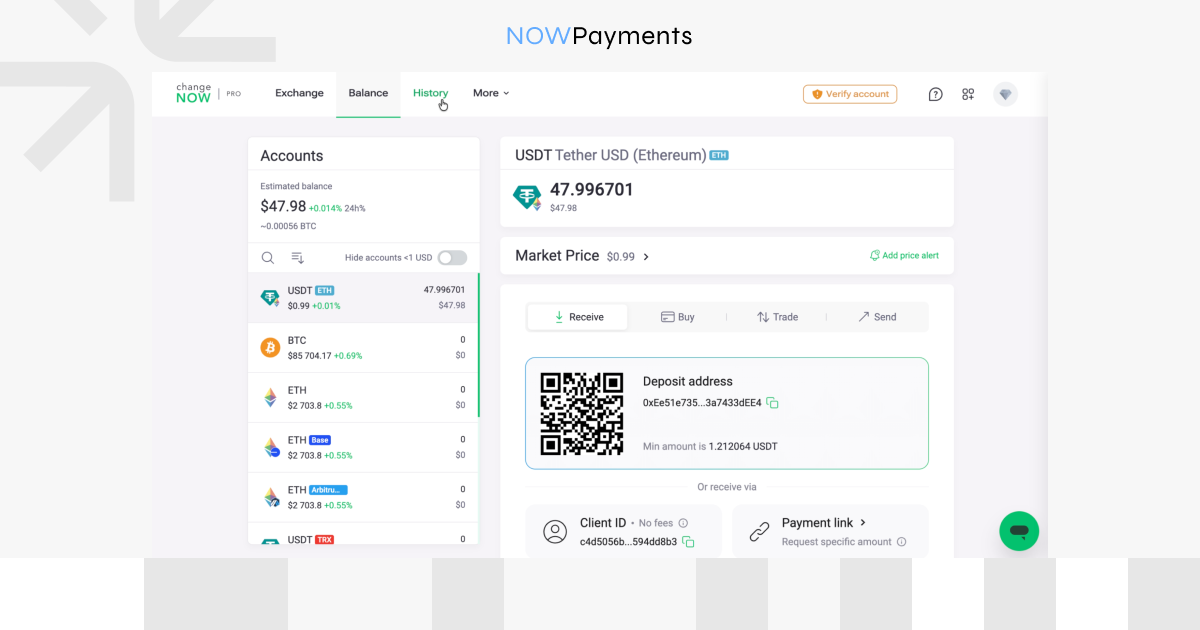
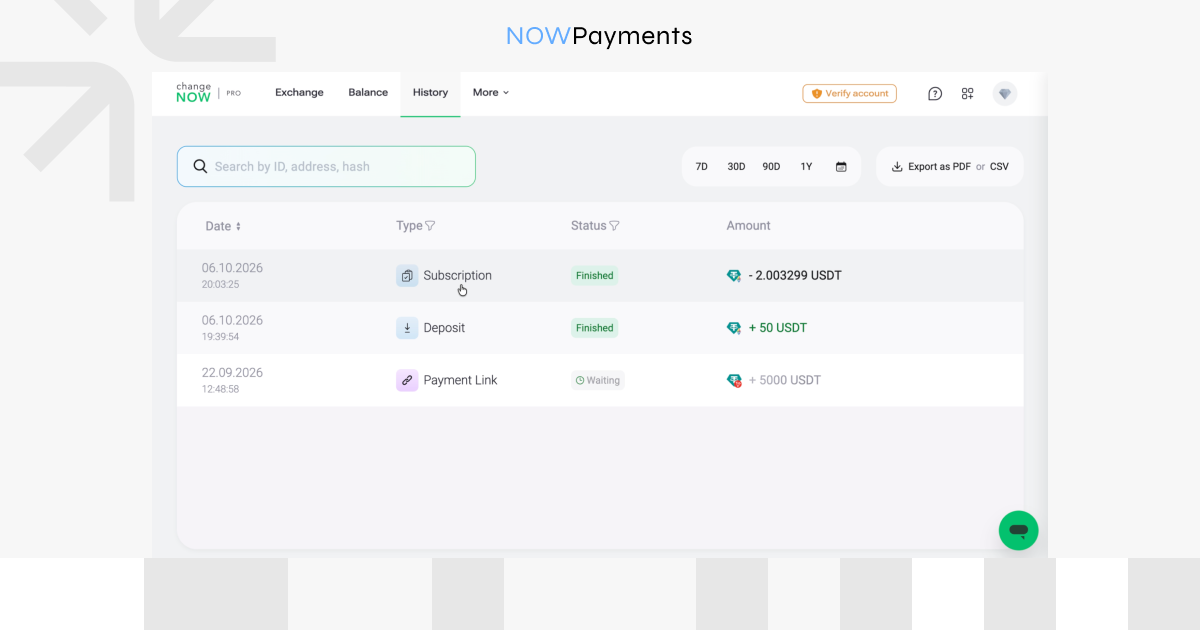
Subscription payments appear in History alongside other transaction types.
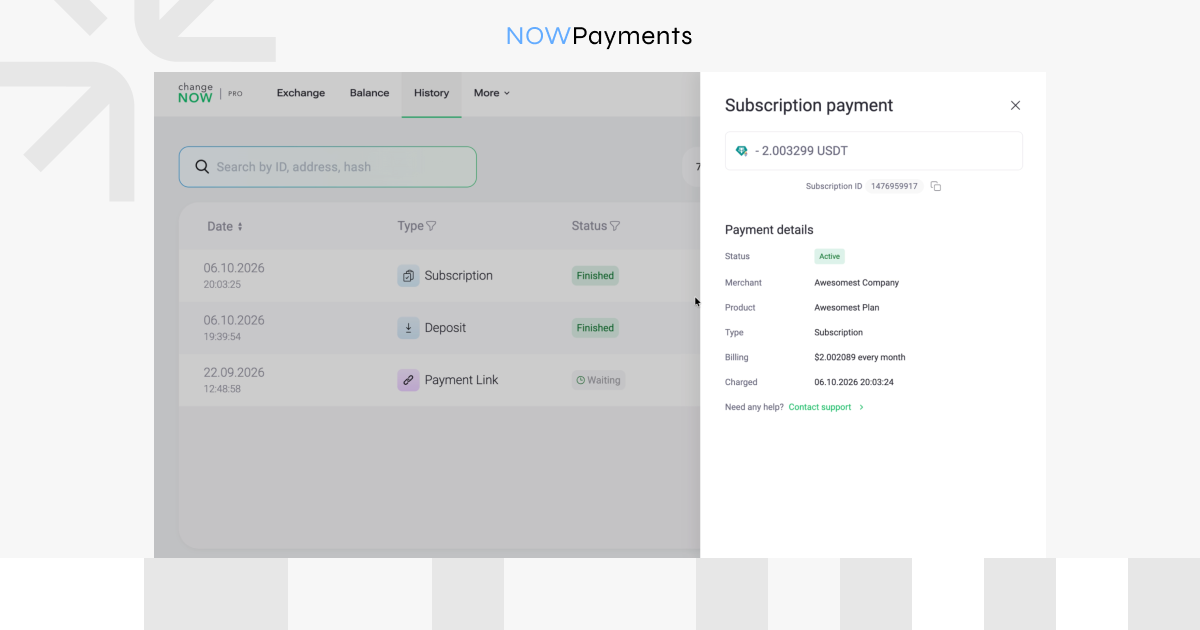
They can see information such as:
- merchant;
- subscription status;
- product;
- transaction type;
- billing conditions;
- next payment date.
They can also cancel the subscription from the ChangeNOW side.
After the customer cancels the subscription, future automatic payments stop.
Start Accepting Recurring Crypto Payments
Recurring crypto billing does not have to require customers to repeat the same checkout every billing cycle.
With NOWPayments, merchants can create a subscription plan once, add customers, and manage subscription activity from the dashboard. For supported billing intervals, customers can authorize automatic payments through ChangeNOW, while businesses that need custom schedules can continue using the invoice-based subscription flow.
FAQ
What are crypto subscriptions in NOWPayments?
NOWPayments subscriptions let businesses create recurring billing plans, add customers, generate individual subscription invoices, and track subscription payments from the merchant dashboard. For supported billing intervals, customers can authorize automatic future payments through ChangeNOW.
Which billing intervals support automatic ChangeNOW payments?
The ChangeNOW recurring payment option currently supports:
- 1 day;
- 7 days;
- 30 or 31 days;
- 365 days.
Other billing intervals can still be used with NOWPayments subscriptions, but they follow the regular invoice-based flow, and future invoices need to be paid manually.
Is a monthly subscription charged on the same date every month?
Not necessarily. ChangeNOW-supported monthly plans currently use an interval of 30 or 31 days, rather than a calendar-month schedule. Use the next automatic payment date shown in the payment flow to check when the following charge is due.
Are there limits for subscription payments through ChangeNOW?
Yes. ChangeNOW currently applies a $500 daily total per customer for this payment flow. This is a daily total rather than a separate limit for each invoice.
Can customers pay without enabling automatic renewals?
Yes. Customers can pay the current invoice from another compatible crypto wallet. Once the payment is confirmed, the subscription becomes active for the paid period, but future renewal invoices must be paid manually.
What happens if an automatic subscription payment fails?
If the plan has a payment grace period, the renewal has additional time to complete after its due date. If payment succeeds within that window, the subscription remains or becomes active. If the renewal is not completed before the grace period ends, the subscription expires and no further automatic payments are initiated.
Can customers cancel an automatic crypto subscription?
Yes. Customers can review and manage their authorized subscription through ChangeNOW and cancel future recurring payments there.
Can merchants create custom subscription periods?
Yes. NOWPayments supports custom billing intervals in days, weeks, months, or years. If the selected interval is not supported by ChangeNOW auto-renewal, the subscription uses the regular invoice-based flow, and the customer needs to complete future renewal invoices manually.
How does the customer receive the subscription invoice?
After the merchant adds a customer, NOWPayments creates an individual subscription and invoice. The customer receives a branded email with the invoice link, and the same link is also available in the merchant dashboard for manual sharing if needed.



Be the first to comment