


You know the drill. Someone types three lines in a chat box, a ‘thinking…’ message appears on the screen, and up pops a canvas with a little square bouncing around. Then the same people start slop-posting about how game design, or writing, or art, or is dead.
I see that, and I just get annoyed. And it’s not just random social media posts, I also see people around me doing the exact same thing and patting themselves on the back for “building” games.
Typing a prompt and getting back one messy HTML file isn’t making a game. It’s a quick tech demo. These kind of “AI game” hype prototypes are either a raw single-prompt code dump, a UI that doesn’t scale to your phone, or something hosted on a default lovable link that nobody will ever visit twice. Technically, sure, it’s a game. But in terms of what these tools can actually do, it’s about as impressive as a “Hello World” program of the current AI tools. It is easy to label the output as slop, because that’s exactly what it is.
This frustration is what got me to spend time and make this compilation about how I do things, as a game designer. I have been using these tools and have found ways to build games that I can actually share, and improve upon. They’re not big & detailed games in any sense of the word, but they are experiments that I can be proud of, games that I can share with my friends, and games that I can actually improve upon.

I’m not going to preach about heavy-duty software engineering here. What I do is still dead simple, but it has actual structure. You can still call the games I make slop if you want, but at least it’s intentionally built slop that IMO can be considered as a valid starting point for making a game, because it has a foundation that you can actually build upon.
If you’ve seen all that hype, wondered what’s actually possible when you have zero technical background, and want a practical way to turn your ideas into something real players can actually try, then this guide is for you.
First, an important caveat: I’m not experienced with coding. I’m just a game designer who’s been designing games professionally for a little more than 16 years now (not-so-humblebrag).
I wouldn’t even call myself a “beginner” when it comes to coding skills. I don’t really know how to code. I can understand where files exist, or maybe if I squint a bit, I can understand what is happening, but that’s about it. That understanding will usually not translate into something that I can fix or build on my own. This is where AI tools have been helpful for me.
That being said, what I do have managed to do is create a few short, scrappy workflows that actually work. They are definitely not perfect. I’m not proposing anything new or radical, and I’m not going to pretend you’re going to release a massive hit and make millions.
My workflow has allowed me to actually get things working. It has helped me to take an idea out of my head, build it, and put it in front of actual players so I can get better at building ideas. You can see some examples of games I’ve made using AI in my journey to figure out these workflows at playable-things.itch.io.
Over the next few posts, I’m going to try and share my process of working that has enabled me to actually create playable stuff quickly over the last few months. You can follow along if you want to build your own little AI game project as we go :
Part 1 (This one): Stop Making Single-Prompt Games.
Treating AI as a collaborator instead of a slot machine, and mapping out the WHYs, WHATs, and HOWs on paper first.
Part 2: Setting Up The Project.
Picking your AI tools, setting up a local folder, and turning your notes into clear specs before touching code.
Part 3: Building and Fixing.
Reading plans critically, catching hallucinations early, prepping visual assets, and getting that first localhost build running.
Part 4: Get It Out Of Your Computer.
Testing the loop, targeted bug fixing, chat hygiene, and packaging for itch.io so people can actually play it.
Let’s start with the trap that almost everyone falls into right away.
The Delusion Of The Single Prompt
The simplest way to use AI is to open a chat window and type what you want. It’s also the fastest way to build yourself into a corner.
If you just want to generate something quick for your LinkedIn feed to collect claps from people who don’t play games, fine. A single prompt in a chat window works for that.
But if you actually want to build a game that you can maintain, tweak, and share with friends, relying on a single chat thread is a disaster waiting to happen.
Think about what happens after that first prompt:
- How long will that chat thread get once you start asking for changes?
- How will you stop the AI from crazy hallucinating and breaking your working mechanics once the chat gets bloated?
- What happens when you just want to tweak the jump height or a timer, but the model decides to rewrite the whole file and deletes your scoring system?
- What if you want to change an early design decision three days later? In a single chat thread, the whole thing collapses into spaghetti.
AI is just a text generator. It doesn’t “understand” your vision, it’s just predicting the next plausible chunk of text. If you hand it a vague prompt, it fills the blanks with the most generic stuff it can muster.
And when you try to fix it inside the same endless chat thread, you end up spending more time fighting hallucinated bugs and token bloat than actually designing anything playable.
The One-Line Prompt Test
AI is a tool, not a psychic mind reader. You have to treat it like a very literal collaborator, not a magic box that knows what you want before you’ve even thought about it.
Don’t take my word for it. Go open your favorite AI chat right now and type this vague prompt:
> Build me a game like Space Invaders but with a farm theme where I am a scarecrow and I am shoo-ing away birds that are landing on my farm. Use a cozy artstyle. Create 10 levels of varying difficulty.
Go ahead. Run it.
You’ll get a game back. But you’ll get whatever the AI imagines on the fly. Here’s screenshots of what I got trying this prompt in Gemini, ChatGPT, and Claude.
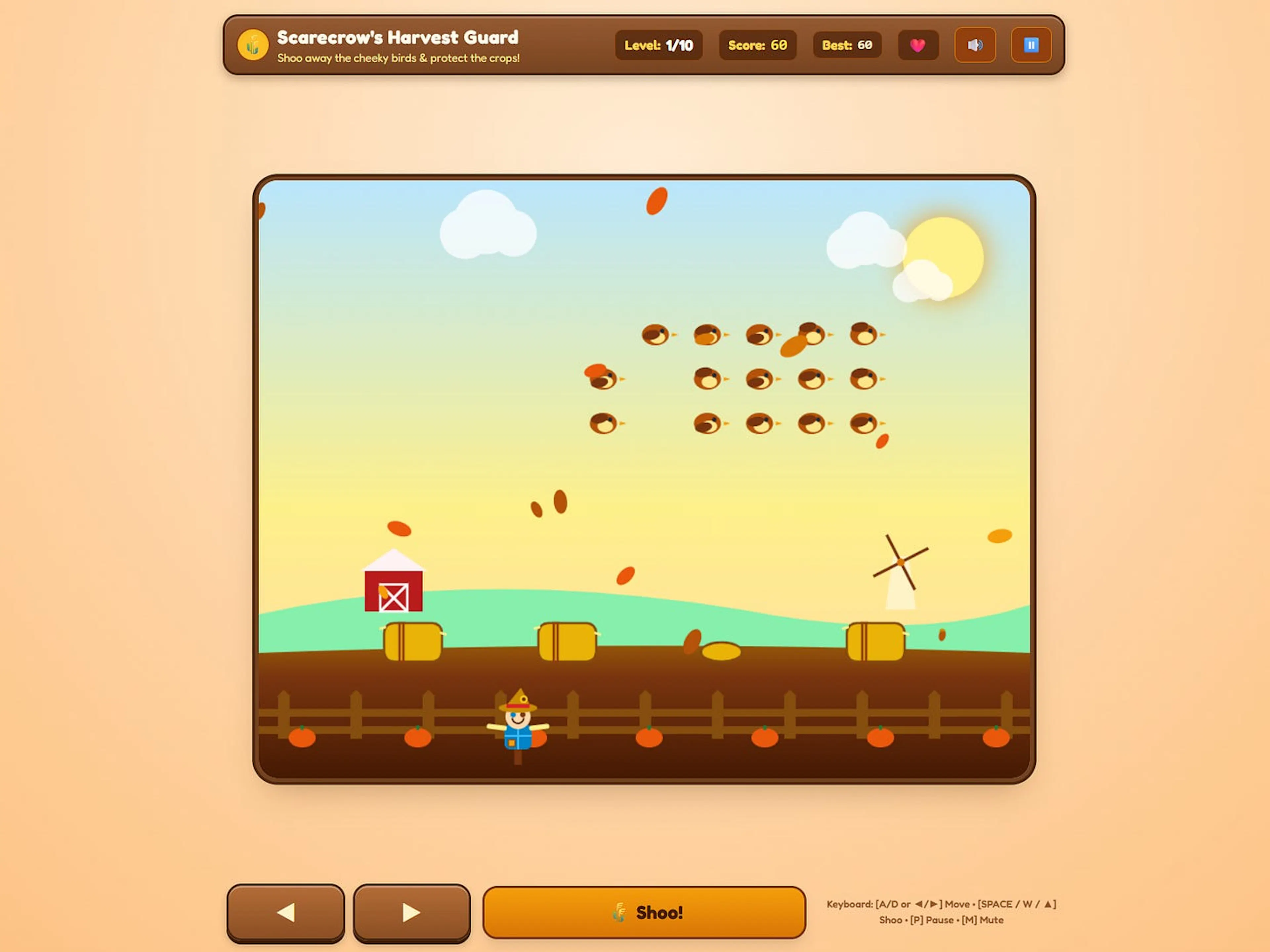
Having a one-line theme does not make you a game designer. No matter how much you convince yourself that writing clever prompts makes you a creator, it doesn’t. If you genuinely believe that, you’re just being a delulu slop-ster.
AI can definitely help you build games without knowing code, but only if you make the actual design decisions yourself. The moment you leave the rules, controls, and interaction up to a prompt box, you aren’t designing a game. You’re just letting a machine roll dice on your behalf.
Design Direction: WHY, WHAT, HOW
This is where actual game design comes in.
You need to know what you want before you ask a machine to build it. Having spent a significant time doing this professionally, I know it can sound intimidating if you’ve never worked on a game. For a small game, you don’t need a 50-page design bible. You just need clear answers to three basic questions on the lines of: WHY, WHAT, and HOW.
Take that same scarecrow game. Instead of letting the AI guess the rules, walk through the actual player experience:
- What does the player actually do on screen? Do you shoot stuff, or do you physically walk over to scare birds away?
- How do you control the character? Is it arrow keys, a virtual joystick, or tap-to-move?
- What are the win and lose conditions? Does the farm have a health bar that drains when birds eat crops, or do you have a timer to survive?
- How difficult is it? Does level 2 just throw more birds, or do the birds move faster?
- Why would someone play this more than once? What happens on play 1 versus play 10?
- How does the player know what to do in the first five seconds?
None of these questions need complex industry answers. You just need an answer that makes sense to you.
Imagine clicking the link to your game. What’s the very first thing that shows up? What does the player click? What happens on every single tap or swipe? Walk through that whole flow in your head.
I believe that the understanding of the WHY, WHAT, and HOW is the foundation of game design. I’ve written about this in one of the earliest pieces here:
UX/UI & Feedback
Just having a mechanic in your head isn’t enough. You have to think about how it feels on screen.
When a player taps, does the game give immediate feedback? When you scare a bird, does it fly away with an animation, or does it just delete itself from the screen?
Grab a piece of paper and sketch it out. Where does the score sit? Where is the pause button? What does the lose screen look like? If you can’t sketch a simple box on paper, how do you expect an AI to lay out a clean UI for you?
Balancing The Rules
A game needs tension, and tension comes from numbers.
How long does a bird sit on a crop before your farm takes damage? 3 seconds? 5 seconds? How long does a wave last? Can you scare away multiple birds at once, or only one by one?
These numbers decide whether your game feels relaxing or completely chaotic. Decide them now. You can always change them later, but you need a baseline.
”You can outsource your thinking, not your understanding.” – Andrej Karpathy (source)
AI is great at writing boilerplate code, putting together file structures, and handling syntax you don’t understand. But it cannot give your game a soul. If you don’t have intent behind what you’re asking it to build, the AI will just guess. And its guesses are always painfully average.
What About Actually Building The Game?
At this point you might be thinking: ”Okay, but when do we actually touch the tools? Isn’t this supposed to be a tutorial?”
Yes, it is. But the best way to move forward is to have this step clear for yourself first.
Right now, you aren’t writing code, you’re just planning what you want to build. The more questions you answer on paper now, the fewer roadblocks and messy rewrites you’ll run into once we start prompting.
So before touching any tools, get all these thoughts out of your head and into rough notes. You don’t need fancy formatting. Just open your notes app and write down:
- The core goal of the game.
- How the player moves and interacts.
- The win and lose rules.
- The basic numbers (timers, speeds, health, etc).
- A quick sketch of what the screen could look like.
Once you have those notes written down, you’re ready.
In Part 2, we’ll get a bit into the weeds. We’ll pick our AI tools, set up Git as our safety net so you never lose progress, scaffold the project, and turn those rough notes into clear specs so that AI can then finally get to work building your game.
TL;DR
- Ditch the Single-Prompt Trap: Typing a clever prompt makes you a prompter, not a designer. Playable games require deliberate rules and decisions, not machine guesswork.
- Bring Design Intent, Not Code: Zero coding experience isn’t a blocker, but outsourcing your thinking is. AI can handle the syntax, but you have to own the player experience.
- Map the WHYs, WHATs, and HOWs: Good design starts with understanding the player’s moment-to-moment journey. If you can’t walk through the flow in your head, the AI can’t build it for you.
- Sketch the Screen and the Numbers: Visual feedback and mechanical tuning give a game its tension and feel. Deciding simple layouts and baseline values early creates a solid foundation to iterate on.
- Prep Your Notes for Part 2: Clear, structured notes bridge the gap between a vague idea and an actionable project ready to build.
Do you have a game idea sitting in your notes app that you’ve been waiting to build? Have you tried prompting an entire game in a chat and watched it blow up after three messages? Drop a comment, I’d love to hear what you’re tinkering with.
(And tbh, please poke me in the replies to keep me accountable so I don’t procrastinate too much and actually publish Part 2 soon!) Don’t forget to subscribe so you don’t miss it!



Be the first to comment